 SwitchMyTool

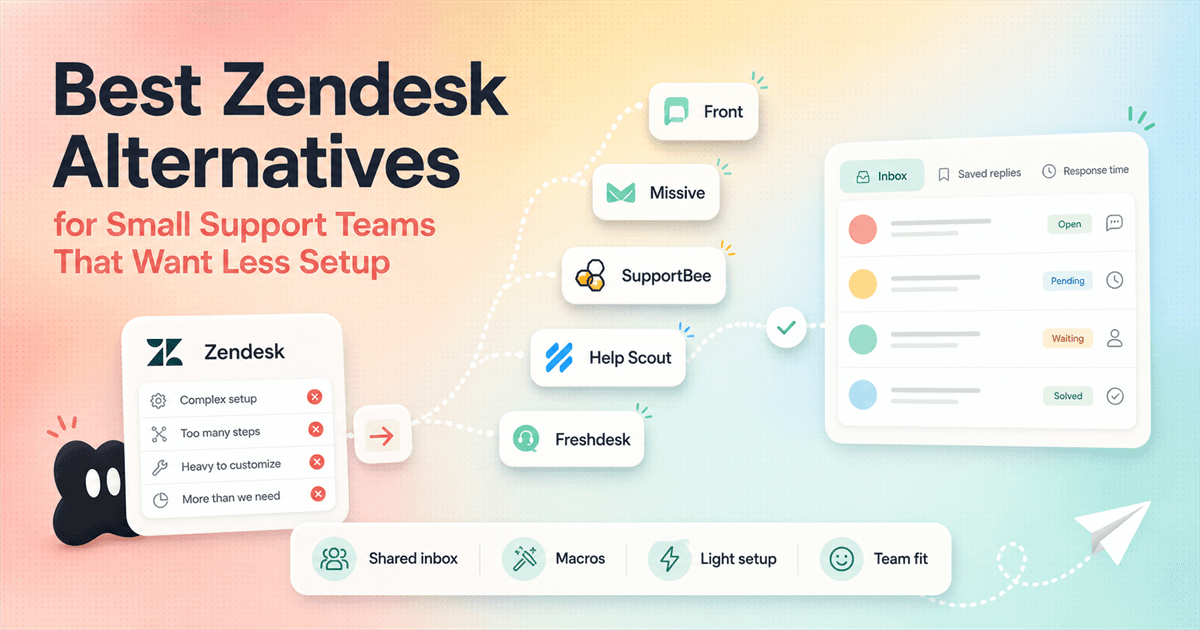
The painful Zendesk alternative search usually starts with a sentence nobody wants to say in a buying meeting: Zendesk is good, but it is too much for us right now.
That is not a dunk on Zendesk. Zendesk is built for real support operations: ticket routing, dashboards, customer context, automations, AI agents, channels, knowledge base, contact center, and governance. If you have a queue that already behaves like a small contact center, those pieces can be useful.
But if you have three agents, one shared inbox, a few saved replies, and a founder checking response times between sales calls, a full CX stack can feel like bringing a moving truck to pick up groceries. The software is capable. The question is whether your team needs that much machinery.
This guide is for that middle zone. You have outgrown a messy Gmail alias, but you do not want to spend weeks configuring queues, triggers, roles, apps, and dashboards. The right Zendesk alternative should make support calmer by Friday, not create a new part-time admin job.
Best overall small-team pick
Missive if your support still behaves like email. It gives you team inboxes, assignments, comments, rules, tasks, and reporting without making every conversation feel like a formal ticket.
Best simple ticketing pick
SupportBee if you want tickets, snippets, knowledge base basics, CSAT, and a small-team price without a big implementation motion.
Best modern shared inbox
Front if you want a more polished shared inbox and ticketing system with a stronger path toward channels, analytics, automation, and larger CX teams.
Best conventional help desk
Help Scout or Freshdesk if you still want a help desk shape, but want something easier to buy and explain than a full Zendesk Suite rollout.
Best reason to stay with Zendesk
You already need routing, dashboards, customer context, AI agents, contact center, and governance. If those are real needs, leaving Zendesk may save money but cost operational clarity.
- The best Zendesk alternative for a tiny support team is usually the one your agents can learn in an afternoon, not the one with the longest enterprise feature list.
- Front is strongest when your team wants a modern shared inbox with better routing and reporting than plain email.
- Missive is the cleanest pick when support still behaves like team email, but you want assignments, comments, tasks, and light automation around it.
- SupportBee is the simple-ticketing pick. It is not trying to become a full CX operating system, and that is the point.
- Help Scout and Freshdesk are safer conventional help desk choices when you need knowledge base, live chat, SLAs, and more familiar support workflows.
The actual trigger
Small teams do not hate Zendesk. They hate buying more system than they can operate.
The Reddit screenshot supplied for this article is useful because it sounds like a real small-team buyer. The poster is not asking for magic AI support. They are asking for a shared inbox, basic ticket routing, saved replies or macros, and a simple dashboard to watch response time.
That is a tight job description. It does not require a giant platform pitch. It requires a tool that keeps customer conversations from falling through the cracks without forcing the team to become help desk administrators.
A good Zendesk alternative should pass four plain tests. Can a new teammate understand the inbox in 10 minutes? Can the team assign, discuss, and close conversations without Slack chaos? Can a manager see the basic health of the queue? Can the bill be explained without a sales call and a spreadsheet?
If the answer is yes, you may not need a bigger tool. You may need a smaller one with better habits.
Before the list
Pick the tool by workflow, not by who has the longest feature page.
Most bad support software decisions come from comparing plan cards in isolation. A feature can be technically available and still be irrelevant to your next 90 days. A cheaper plan can also be a trap if the thing your team needs lives one tier up.
Start with your support reality. Count agents. Count weekly conversations. Count channels. Count the number of times a customer was ignored because two people assumed the other person would reply. That last number matters more than almost every feature checklist.
If support is mostly team email
Missive
If you want the simplest ticketing system
SupportBee
If customer conversations span email, SMS, and social
Front
If you need docs, live chat, and a gentle help desk
Help Scout
If you need a cheaper conventional help desk
Freshdesk
If support is already an operation
Zendesk
Fast comparison
The practical Zendesk alternative shortlist for small support teams.
Prices below come from the official pricing pages captured for this article on July 8, 2026. Treat them as a starting point, not a final invoice. Add-ons, billing terms, seat minimums, discounts, and regional checkout can change what you actually pay.
| Tool | Official visible entry price | Best fit | Setup feel |
|---|---|---|---|
| Missive | $14 per user/month billed yearly | Email-first support teams that want shared inbox collaboration without a heavy help desk rollout. | Low. The mental model is close to email, with assignments, comments, team inboxes, rules, and reporting layered in. |
| SupportBee | $17 per seat/month billed yearly | Small teams that want simple tickets, snippets, knowledge base, customer management, CSAT, and basic integrations. | Low to medium. You still need to map queues and snippets, but the product is intentionally narrow. |
| Front | $25 per seat/month | Teams that want shared inbox plus ticketing, AI topics, basic analytics, and a path toward omnichannel support. | Medium. It can stay simple, but automation, channels, and ownership rules need setup. |
| Help Scout | $25 per user/month for Standard | Growing teams that want a friendly help desk with inboxes, docs, live chat, saved replies, SLAs, and AI Answers as an add-on. | Medium. It feels lighter than Zendesk, but you still need to configure inboxes, Docs, workflows, and saved replies. |
| Freshdesk | $19 per agent/month billed annually for Growth | Teams that want a familiar help desk shape with ticketing, customer portal, reports, shared inbox, threads, and tasks. | Medium. The product is more traditional and can grow complex if you add portals, routing, custom objects, and multiple channels. |
| Zendesk | $19 per agent/month paid yearly for Support Team | Teams that already need formal ticketing, routing, dashboards, customer context, automations, and room to grow into Suite. | Medium to high. The work is not just importing tickets. It is admin ownership, workflows, training, add-ons, and governance. |
Best modern shared inbox
Front is for teams that still want inbox speed, but need more accountability than email.
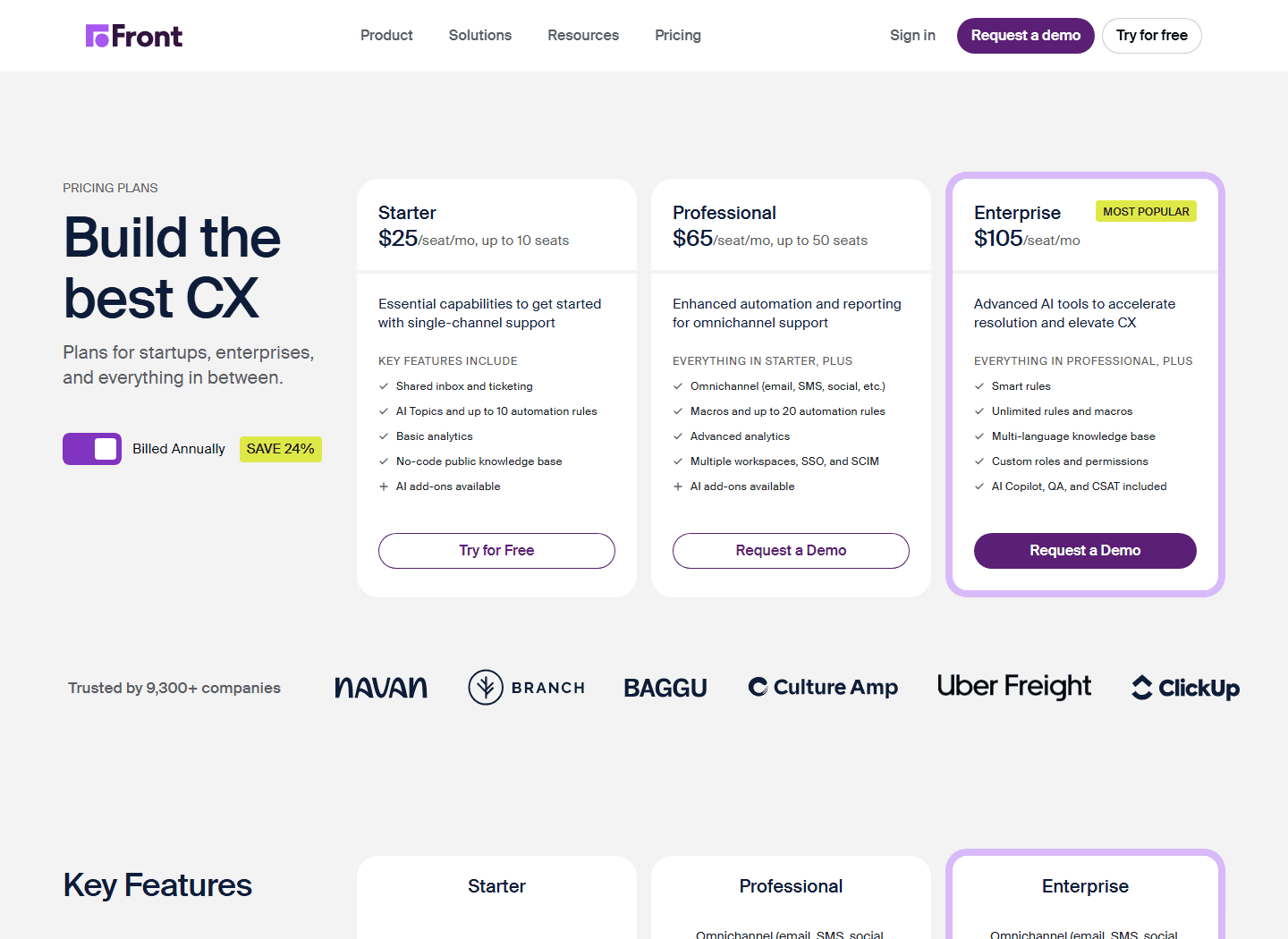
Front is the Zendesk alternative I would test when your support team thinks in conversations, not tickets. The official pricing page lists Starter at $25 per seat/month for up to 10 seats, with shared inbox and ticketing, AI topics, up to 10 automation rules, basic analytics, a public knowledge base, and AI add-ons available.
That shape fits the Reddit thread well. One commenter said Front is pretty good if you treat support like a shared inbox, and that the UI is basically email. That is not faint praise for a tiny team. Familiarity is a feature when the alternative is a three-week rollout that nobody asked for.
Front starts to make more sense when support is tied to customer success, sales, onboarding, or account management. If a customer conversation needs a handoff, a comment, a visible owner, and a measured response time, Front gives you structure without immediately making the whole company talk in tickets.
The caution is cost shape. Front's Starter plan is not the cheapest option here, and its higher tiers move quickly. If you need omnichannel support, macros, advanced analytics, SSO, SCIM, or included AI Copilot and QA, you are no longer buying a tiny shared inbox. You are buying a more serious CX layer.
Best for
Teams where support overlaps with sales, success, ops, or account work, and the inbox needs clear ownership.
Not for
Teams that only want the cheapest possible email ticketing system.
Migration cost
Medium. Map shared inboxes, assignment rules, tags, macros, and ownership habits. The product is friendly, but bad inbox hygiene still follows you.
Reddit complaint to watch
If your only problem is a messy email queue, Front may still be more system than you need. Test whether the extra visibility changes behavior.
Best email-first option
Missive is the simplest answer when your team says, "We just need email to stop being chaotic."
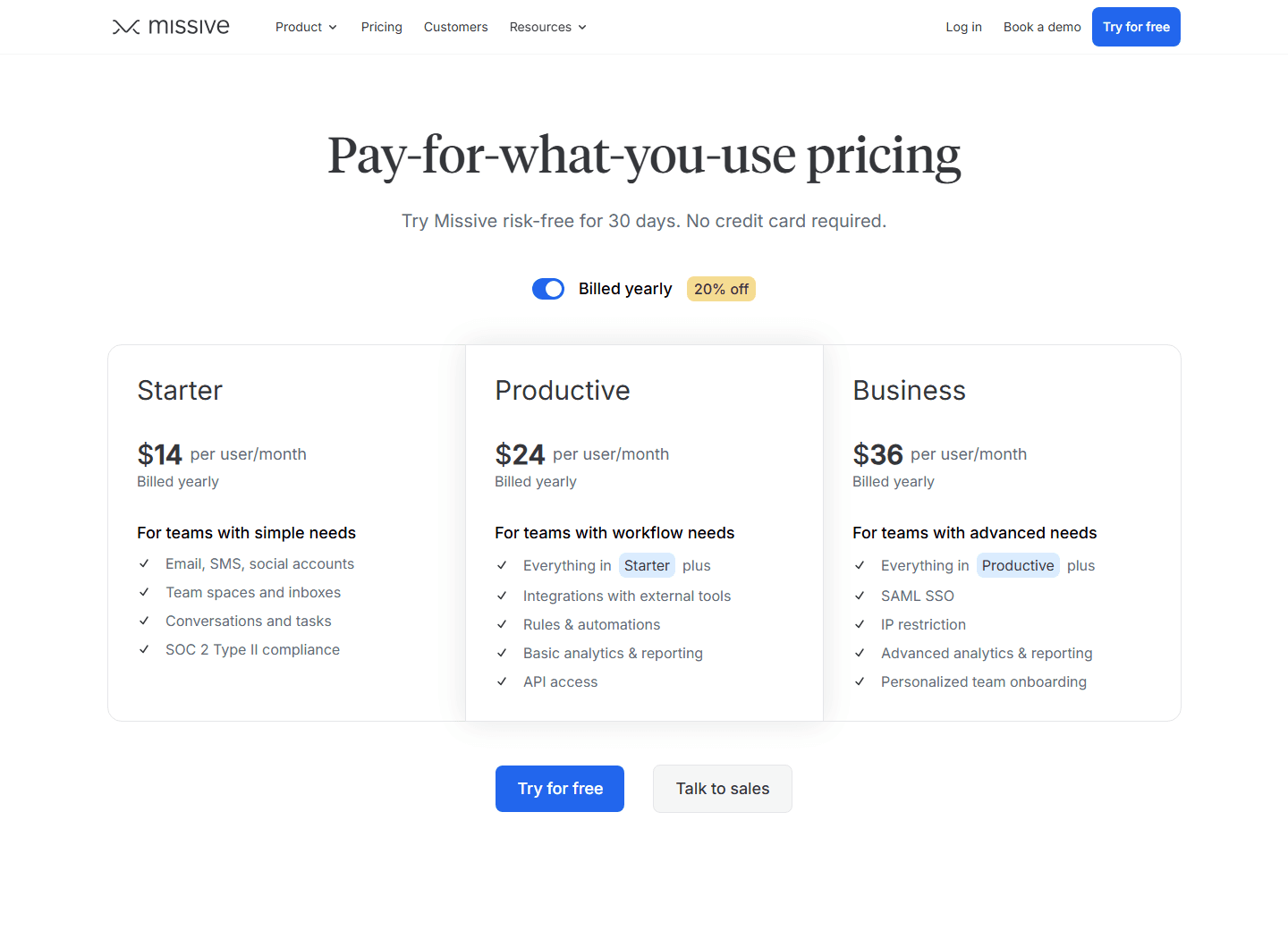
Missive is the most natural Zendesk alternative for a team that lives in email and does not want to pretend otherwise. The official pricing page shows Starter at $14 per user/month billed yearly for teams with simple needs, including email, SMS, social accounts, team spaces and inboxes, conversations and tasks, and SOC 2 Type II compliance.
The Productive plan at $24 per user/month adds integrations, rules and automations, basic analytics and reporting, API access, and a higher user ceiling. Business at $36 adds SAML SSO, IP restriction, advanced analytics and reporting, and personalized onboarding.
The Reddit screenshot makes the case for Missive better than a brand campaign could. One commenter calls it "insanely good" for team collaboration on email and chat, then mentions transparent pricing. The original poster immediately reacts to the pricing transparency. That is the buyer emotion: please do not make me book a sales call to learn whether my small team can afford the thing.
Missive will not satisfy every help desk buyer. If you need a customer portal, deep ticket lifecycle reporting, multiple SLA policies, or a classic support organization chart, you may hit the edges. But if you mostly need to stop duplicate replies, lost threads, and "who owns this?" confusion, Missive is the cleanest first test.
Best for
Tiny teams, founders, agencies, ecommerce operators, and B2B SaaS teams where support still feels like collaborative email.
Not for
Teams that need a formal ticket portal, heavy SLA reporting, or deep contact center workflows.
Migration cost
Low. Start with one support inbox, copy your best saved replies, assign owners, and run a two-week pilot.
Reddit complaint to watch
If stakeholders expect a traditional help desk report, Missive's email-first feel may look too light until you show the actual response workflow.
Best gentle help desk
Help Scout feels more like customer support software than team email, but it still avoids a lot of enterprise weight.
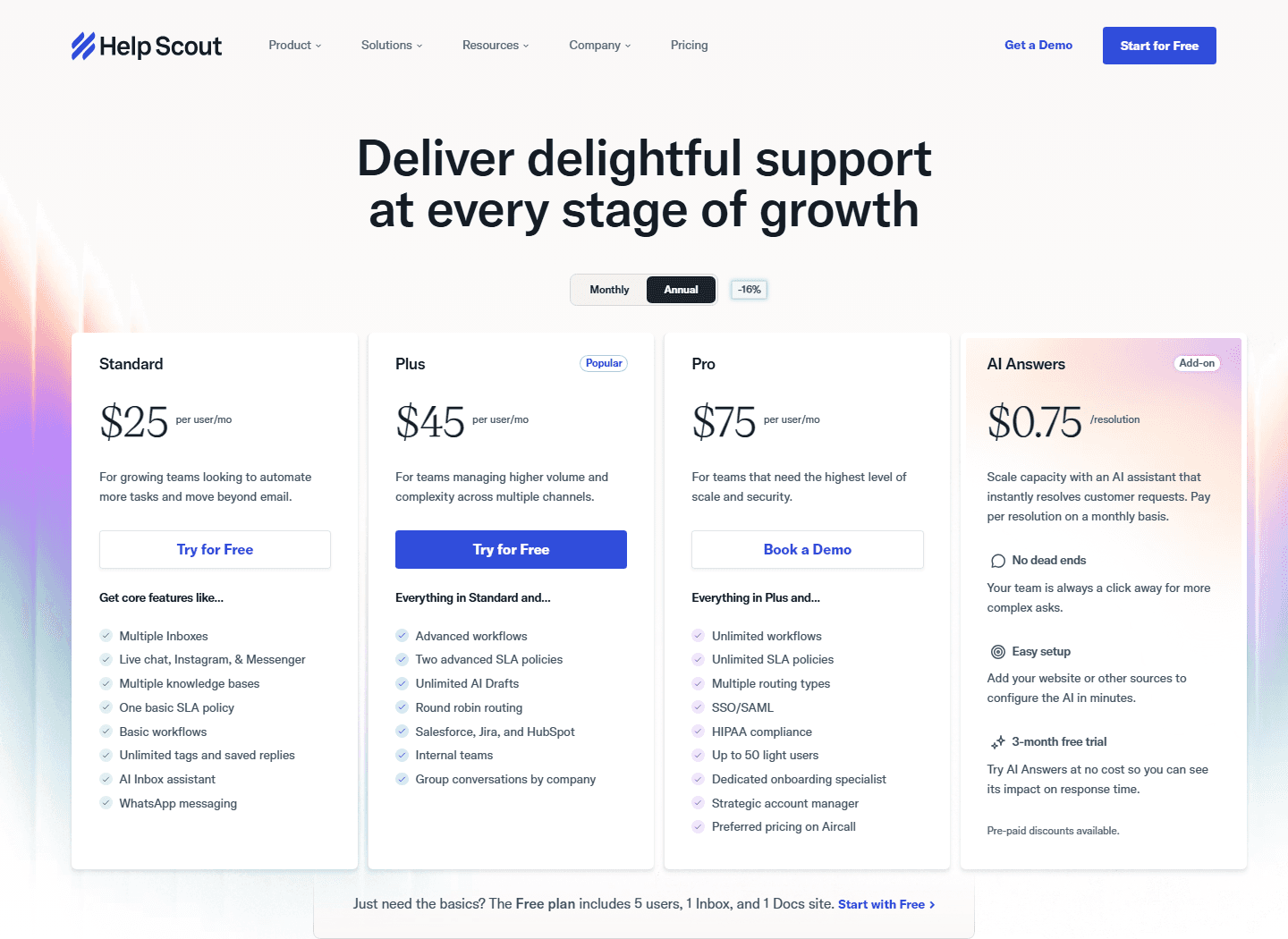
Help Scout is the Zendesk alternative I would shortlist when you want a real help desk, not just a smarter inbox, but you still care about ease. The official pricing page shows Standard at $25 per user/month, Plus at $45, and Pro at $75. It also shows AI Answers as an add-on priced at $0.75 per resolution, plus a free plan for 5 users, 1 Inbox, and 1 Docs site.
The Standard plan includes multiple inboxes, live chat, Instagram and Messenger, multiple knowledge bases, one basic SLA policy, basic workflows, unlimited tags and saved replies, AI Inbox assistant, and WhatsApp messaging. That is already a serious step beyond "reply from Gmail and hope."
Help Scout is a better fit when customers need a polished support experience and your team needs a clean internal workspace. It works well for SaaS, services, ecommerce, and communities that want Docs, chat, saved replies, and simple reporting in one place.
The caveat is that Help Scout is not necessarily the cheapest small-team move once you need multiple users and add-ons. It is a calmer help desk, not a free shared inbox. Buy it because the support experience matters, not because you are trying to avoid all process.
Best for
Growing teams that need inboxes, Docs, chat, saved replies, light SLAs, and workflows without jumping straight into Zendesk Suite.
Not for
Teams that want the most email-like interface or the lowest per-seat price.
Migration cost
Medium. Expect work around Docs, inbox setup, workflows, tags, saved replies, and customer-facing support links.
Reddit complaint to watch
Small teams may still feel like they bought more help desk than they needed if they do not use Docs, chat, or workflows.
Best simple ticketing
SupportBee is the option for teams that want support software to stay boring.
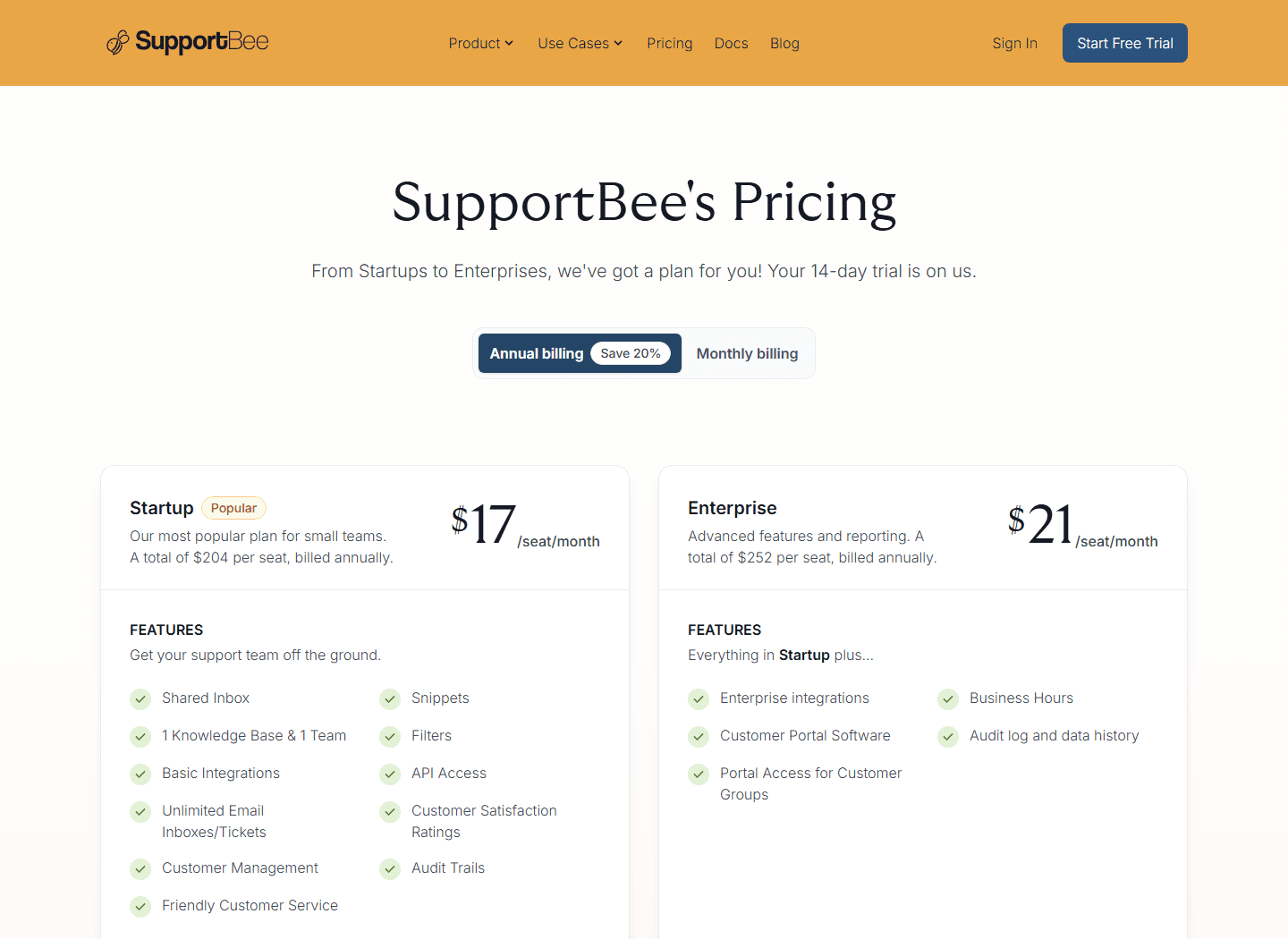
SupportBee is the least dramatic option in this guide, which is why it belongs here. The official pricing page lists Startup at $17 per seat/month billed annually and Enterprise at $21 per seat/month billed annually, with a 14-day trial. Startup includes shared inbox, snippets, 1 knowledge base and 1 team, filters, basic integrations, API access, unlimited email inboxes and tickets, customer satisfaction ratings, customer management, audit trails, and customer service.
That is the small-team checklist in plain clothing. It does not read like a platform manifesto. It reads like a tool for handling customer emails as tickets, answering faster, and knowing who is responsible.
In the Reddit screenshot, someone simply asks, "Have you considered SupportBee?" That is exactly how this product tends to enter the conversation. It is not the default brand people name first, but it lines up with the job when the job is deliberately modest.
I would not choose SupportBee for a team that already needs advanced routing, deep automation, or a large reporting model. I would absolutely test it for a small ecommerce, SaaS, or services team that wants tickets without ceremony.
Best for
Small teams that want simple tickets, snippets, shared inboxes, CSAT, customer records, and basic integrations.
Not for
Teams that need omnichannel routing, heavy automation, or executive reporting dashboards.
Migration cost
Low to medium. Rebuild tags, snippets, filters, and one knowledge base. Keep the first rollout narrow.
Reddit complaint to watch
It may feel too plain if your team is secretly looking for a full CX platform at a smaller price.
Best familiar help desk
Freshdesk is the conservative Zendesk alternative when you still want ticketing to look like ticketing.
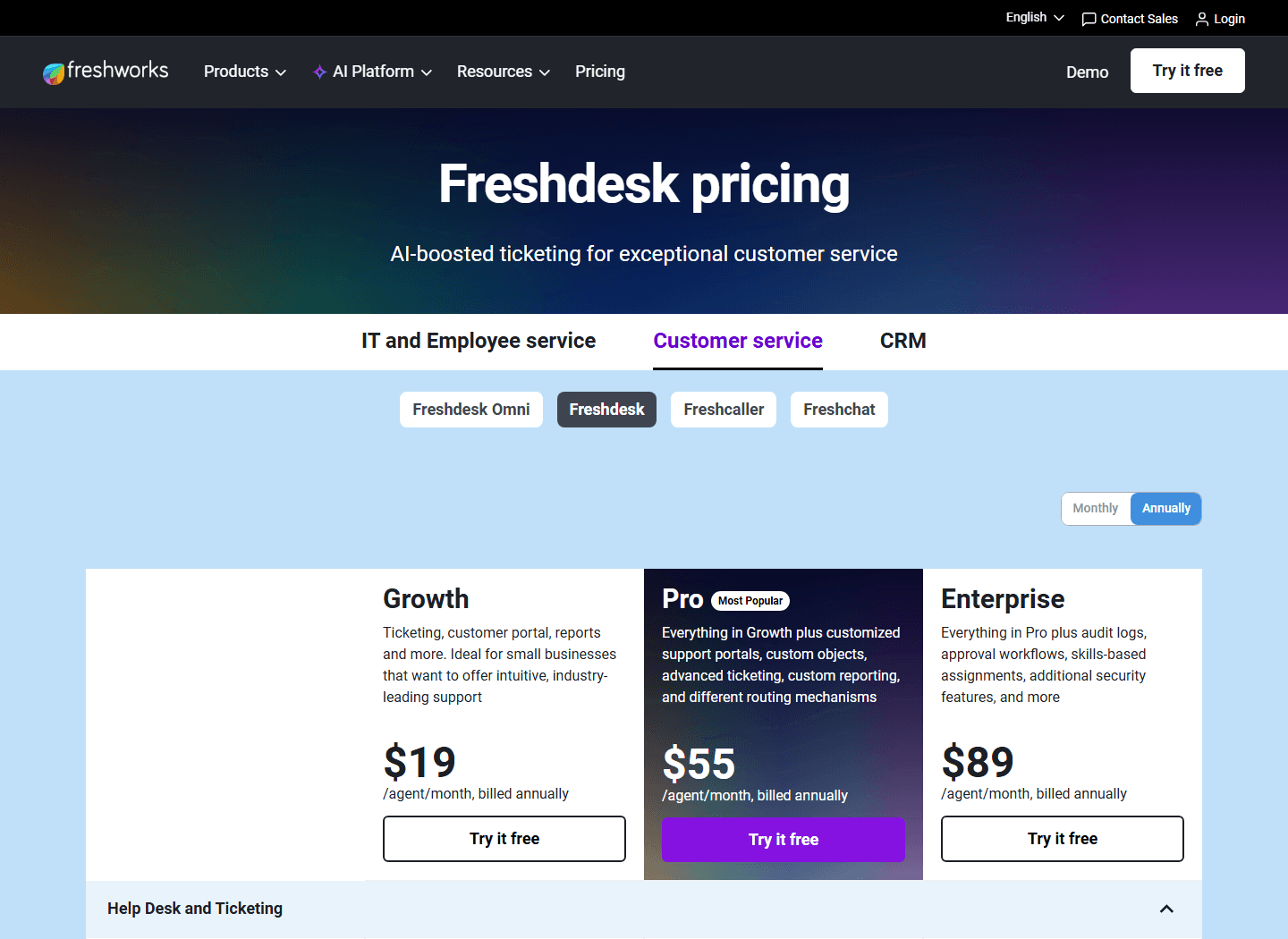
Freshdesk is not the lightest tool here, but it is one of the most obvious Zendesk alternatives for buyers who want a recognizable help desk without Zendesk's exact cost and Suite path. The official page shows Growth at $19 per agent/month billed annually, Pro at $55, and Enterprise at $89. It also advertises a free program for 1 to 2 agents for 6 months with essential help desk features and no credit card required.
Growth covers the basics buyers expect: ticketing, customer portal, reports, shared inbox, threads and tasks, and multilingual help desk. Pro adds customized support portals, custom objects, advanced ticketing, custom reporting, and different routing mechanisms. Enterprise adds audit logs, approval workflows, skills-based assignments, and more security features.
Freshdesk is a good comparison point because it does not ask you to abandon the help desk model. If the team already thinks in tickets, queues, portals, and reports, Freshdesk may feel easier to evaluate than a shared inbox tool.
The warning is the same warning as Zendesk, just smaller at first. Once you add portals, custom reporting, approvals, routing, and multiple Freshworks products, you can recreate the complexity you were trying to escape. Use Freshdesk when you want a conventional help desk. Do not use it as a pretend shared inbox.
Best for
Teams that want a recognizable ticketing product with portal, reports, routing, and a lower entry point than many enterprise suites.
Not for
Teams whose real need is email collaboration with a tiny amount of structure.
Migration cost
Medium. Expect ticket field mapping, portal setup, reporting cleanup, routing decisions, and agent training.
Reddit complaint to watch
If the team is allergic to process, Freshdesk may feel like a cheaper version of the same complexity.
Do not switch blindly
Zendesk is still the right answer when support has become a real operation.
The worst version of a "switch away from Zendesk" project is the one that starts with price anger and ignores workflow reality. Zendesk may be too heavy for a small team, but it is not heavy by accident. It is trying to serve teams with multiple channels, queue ownership, reporting needs, AI workflows, governance, and contact center requirements.
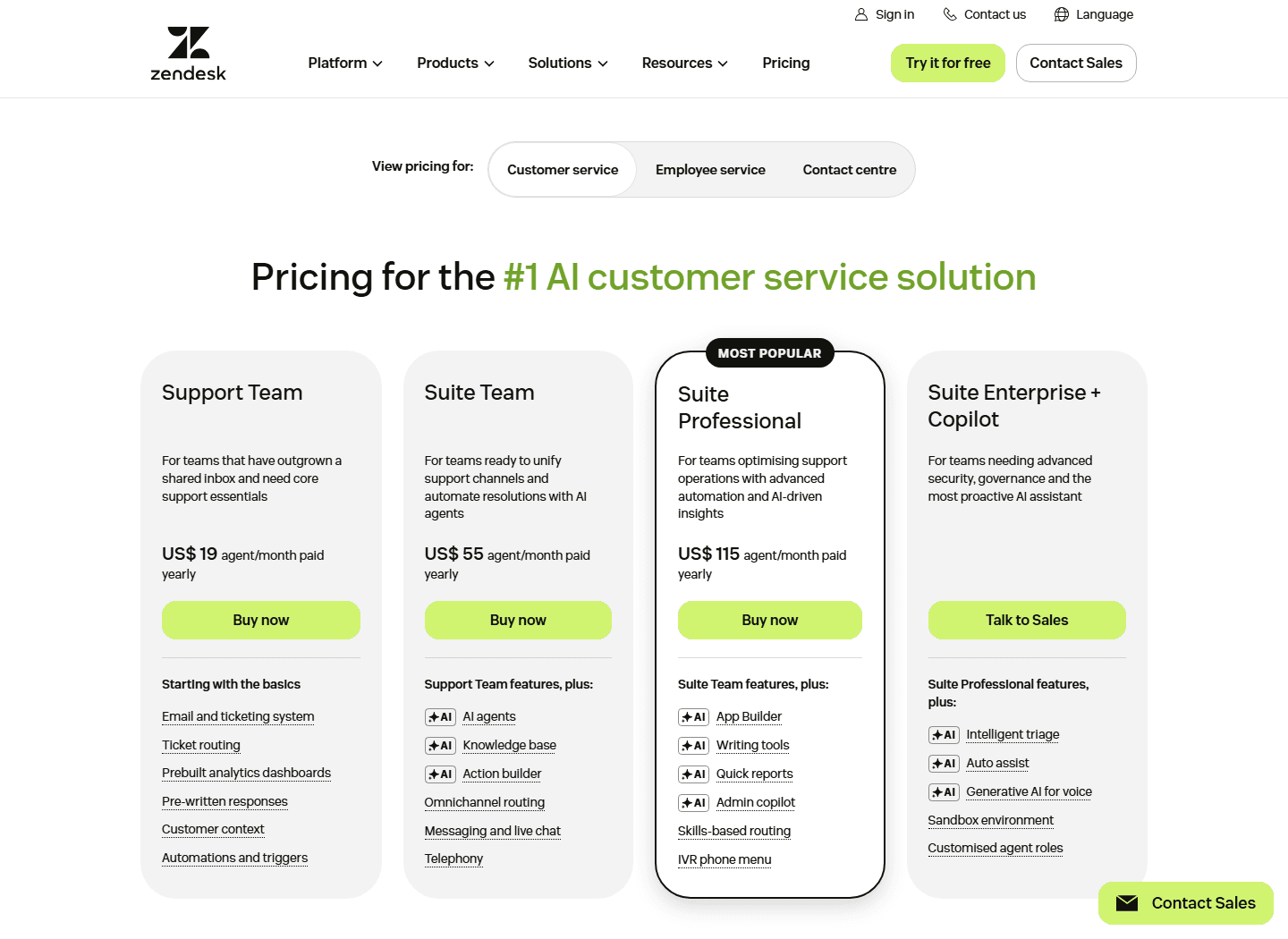
The official pricing page shows why this matters. Zendesk Support Team starts at US$19 per agent/month paid yearly. But Suite Team at US$55 adds AI agents, knowledge base, Action Builder, omnichannel routing, messaging and live chat, and telephony. Suite Professional at US$115 adds App Builder, writing tools, quick reports, admin copilot, skills-based routing, and IVR phone menu.
If those features replace several tools, Zendesk may be rational. If they are mostly unused plan-card glitter, you are paying for a future team you do not have.
Stay if
Support volume is high, the queue spans multiple channels, managers need reporting, and there is a real owner for admin work.
Switch if
The team mainly needs shared ownership, saved replies, basic routing, and fewer places for a customer email to get lost.
Hard truth
A simpler Zendesk alternative will not fix unclear ownership. It only makes unclear ownership easier to see.
Customer research
The Reddit complaints point to buying friction, not just product dislike.
I would not build a whole buying decision from one Reddit screenshot. I would use it for what Reddit is good at: language, friction, and the complaints people say out loud when there is no vendor demo in the room.
The thread supplied for this guide has a clear buyer profile. The team wants a shared inbox, basic ticket routing, saved replies or macros, and a simple dashboard. They would rather avoid setup time and avoid hiring someone just to keep the support system running.
Small-team overkill
The Reddit screenshot starts with a buyer asking for a simpler Zendesk alternative because Zendesk feels more powerful than the team needs.
Shared inbox language
One reply recommends Front because the UI feels like email and people can learn it quickly. That is a useful filter for teams that do not want to retrain everyone around ticket mechanics.
Transparent pricing frustration
Another reply praises Missive for transparent pricing, and the original poster immediately reacts to that point. Small teams hate sales calls when they only need a simple monthly number.
Lightweight help desk interest
SupportBee appears as a suggestion in the thread. That tracks with the buyer's stated need: basic routing, saved replies, and a simple dashboard.
Bias warning
Reddit is not a statistically clean sample. It skews toward annoyed, technical, or deal-sensitive buyers. Use it as language and complaint mining, not as a market share report.
The strongest pattern is not "Zendesk bad." The stronger pattern is "Zendesk may be too much for this job." That is an important difference. If your support team is tiny, complexity hurts twice. You pay for it once in the bill and again in the time your team spends working around it.
Switching cost
The cheaper tool wins only if the migration does not eat the savings.
Small teams often undercount migration cost because the current support setup feels informal. "We only have one inbox" sounds easy until you list every hidden habit around it: labels, saved replies, customer notes, VIP customers, refund rules, bug escalation, owner handoff, and the exact Slack message someone sends when a customer is angry.
Before switching, write down the support process as it happens on a bad Tuesday. Not the process in your onboarding doc. The real one. Who notices a stale conversation? Who answers refund requests? Who can promise a workaround? Who follows up after engineering fixes a bug? Your Zendesk alternative has to support that workflow or force a better one.
Data export
Tickets, customers, tags, attachments, internal notes, and help center content may not move cleanly. Export a sample before committing.
Workflow rebuild
Saved replies, macros, inbox rules, routing, SLAs, and automations usually need to be rebuilt rather than copied perfectly.
Agent retraining
Even a simple Zendesk alternative changes daily habits: assignment, handoff, internal comments, escalation, and closing rules.
Customer-facing changes
If you change email addresses, portals, chat widgets, or knowledge base URLs, expect cleanup work and a short confusion window.
Reporting reset
Response time and resolution metrics may shift because each tool counts conversations slightly differently. Do not compare week one against old reports too literally.
30-day test
Run one queue through the new tool before migrating the whole support operation.
Do not migrate everything because a pricing page looked good at midnight. Pick one queue. Pick one team. Pick one month. Then measure whether the new workflow makes work easier.
- Week 1: import or forward one support inbox, set ownership rules, add the 10 saved replies your team actually uses, and define what counts as closed.
- Week 2: test assignments, internal comments, reopen behavior, customer handoff, and after-hours ownership.
- Week 3: review first response time, resolution time, duplicate replies, missed conversations, and the number of times agents asked where something lives.
- Week 4: compare admin time, agent mood, customer-facing mistakes, and the real quote after needed seats and add-ons.
The best result is not always "we saved money." Sometimes the best result is "we learned Zendesk was the right tool after all." That is still useful. It means the buying decision is tied to workflow evidence, not brand anxiety.
FAQ
Common questions about choosing a Zendesk alternative.
What is the best Zendesk alternative for a small support team?
Missive is the easiest first test for email-first teams, SupportBee is the simplest ticketing-first option, Front is strong for modern shared inbox workflows, Help Scout is a polished help desk middle path, and Freshdesk is a familiar Zendesk alternative when you want conventional ticketing at a lower entry price.
Which Zendesk alternative is cheapest?
Among the official pages checked for this guide, Missive starts at $14 per user/month billed yearly and SupportBee starts at $17 per seat/month billed annually. Freshdesk Growth and Zendesk Support Team both show $19 entry pricing, but their feature shape is different.
When should a small team stay with Zendesk?
Stay with Zendesk if your team needs formal routing, dashboards, customer context, knowledge base work, AI agents, contact center options, governance, and an admin who can own the system.
What is the migration cost when switching away from Zendesk?
Expect work around exports, customer records, tags, macros, automations, inbox routing, help center content, reporting definitions, and agent training. The cheapest tool can still be expensive if the move breaks daily support habits.
Why do Reddit users ask for a simpler Zendesk alternative?
The Reddit screenshot supplied for this article focuses on small teams that mainly need a shared inbox, basic routing, saved replies, and a simple dashboard. The complaint is not that Zendesk is bad. It is that Zendesk can feel larger than the job.
Official sources


