 SwitchMyTool

Quick answer
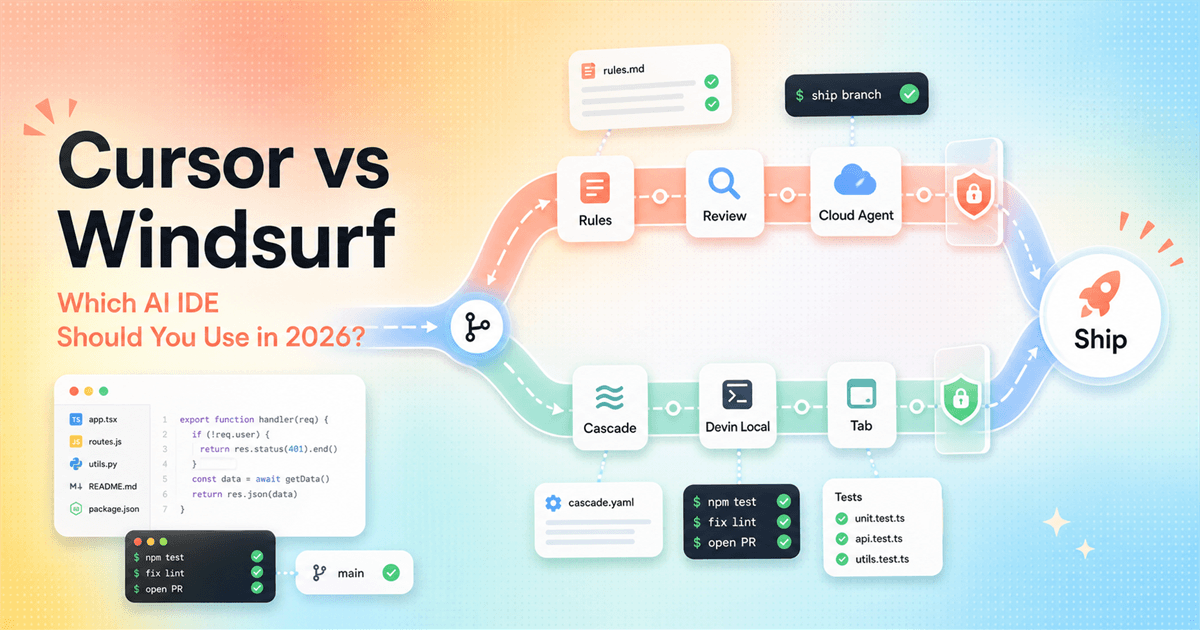
Cursor is the safer default. Windsurf, now Devin Desktop, is the more interesting bet if you want the IDE pulled closer to a full agent platform.
If a friend asked me which AI IDE to install today, I would say Cursor first. It has the cleaner buying path, clearer rule system, strong editor polish, and enough team controls that you can recommend it without a twenty-minute caveat. Cursor also has the boring advantage of being easy to describe: it is an AI code editor with Agent, Tab, rules, cloud agents, and team features.
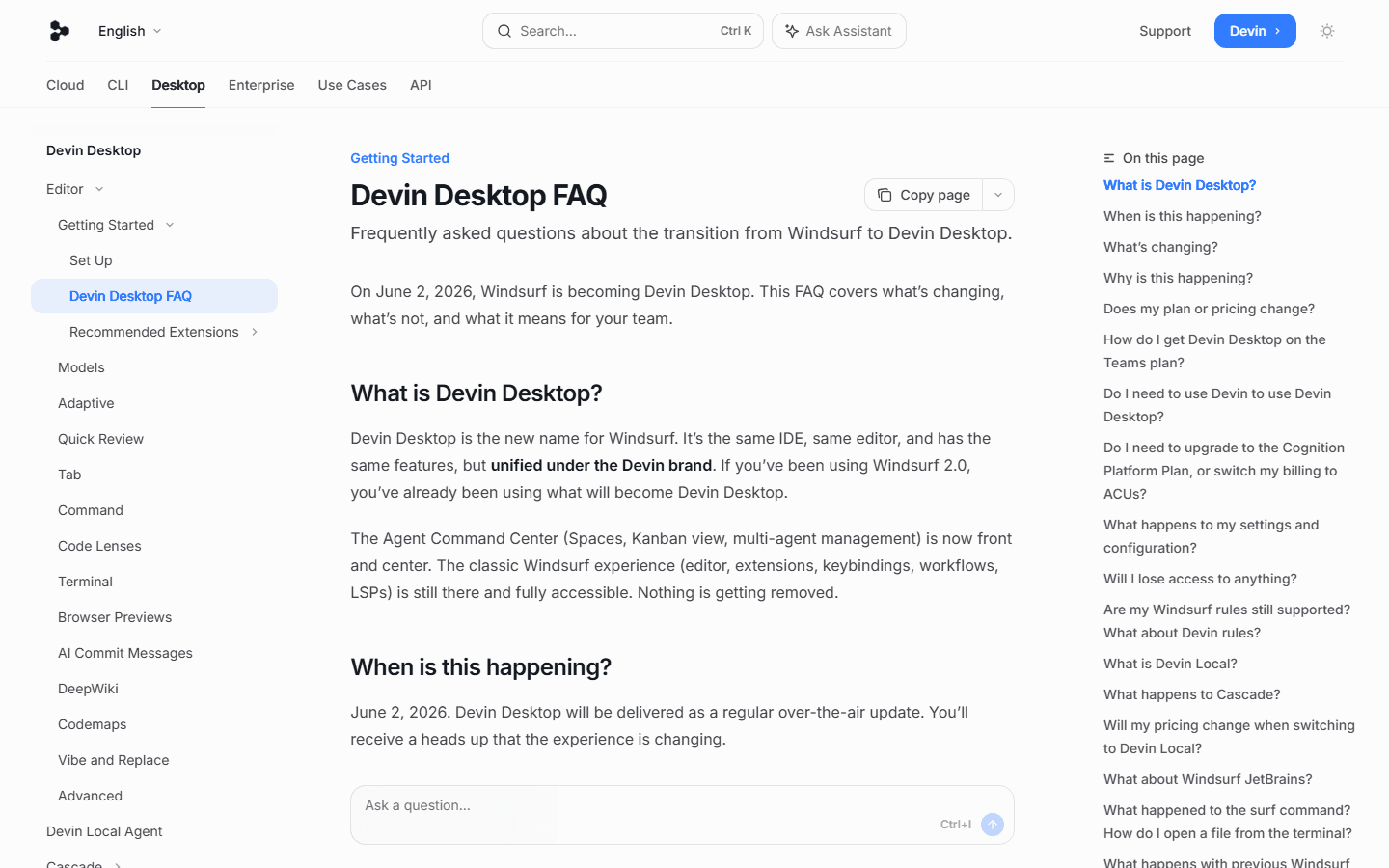
Windsurf is harder to summarize because the product story changed. The official Devin docs say Windsurf becomes Devin Desktop on June 2, 2026. Devin says the IDE, editor, and features remain, but the brand and emphasis shift toward Devin. That makes it less tidy as a buyer decision and more interesting as a workflow bet.
The practical cursor vs windsurf answer depends on where your pain lives. If your pain is keeping an AI assistant consistent across a repo, Cursor's rules are a big deal. If your pain is wanting local and cloud agents to feel like one family of tools, Devin Desktop deserves a test. If your pain is just "I want autocomplete that does not annoy me," both products are good enough that the winner will come down to taste, latency, and how often suggestions get in your way.
I would not switch a team overnight for either tool. Run a week-long bakeoff. Use the same repo, same tasks, same rule file, same review checklist, and same model budget. The IDE that gives you cleaner diffs and fewer interruptions wins. The one with the better launch video can sit down.
Working rule
Choose Cursor if you want the cleaner editor-first path, mature project rules, team rules, cloud agents, and a pricing page that is easier to explain to a manager.
Working rule
Choose Windsurf, now Devin Desktop, if you already liked Cascade, want Devin Local inside the editor, or want an IDE that is being pulled closer to Devin's agent workflow.
Working rule
The comparison changed in 2026. Windsurf is no longer just Windsurf. The official Devin docs say Windsurf becomes Devin Desktop on June 2, 2026.
Working rule
Do not decide from a demo. Run the same bug fix, refactor, test failure, and docs task in both tools for a week. The better IDE is the one that interrupts you less.
The 2026 reset
You cannot compare Cursor with the old Windsurf mental model anymore.
A lot of old Cursor vs Windsurf articles are now awkward. They treat Windsurf as a stable, separate editor brand and compare it with Cursor as if both products froze in late 2025. That is not the buying situation in July 2026. The Windsurf website and the Devin docs both point to the same reality: Windsurf is now Devin Desktop.
That does not mean the old Windsurf experience vanished. The official FAQ says Devin Desktop is the new name for Windsurf, with the same IDE, same editor, and same features under the Devin brand. It also says the classic Windsurf experience, including editor behavior, extensions, keybindings, workflows, and LSPs, is still available. That matters if you already use Windsurf. You are not choosing between your known editor and a totally new product on a random Tuesday.
But the emphasis changed. Devin puts the Agent Command Center front and center. The docs now talk about Devin Local, Devin CLI, cloud agents, Spaces, and multi-agent management. The product looks less like "Cursor with different vibes" and more like a desktop edge for Devin's agent platform. That is the frame I would use for this decision.
Cursor took a different route. Cursor still reads as an editor-first product. Yes, it has cloud agents, Bugbot, rules, MCPs, skills, hooks, and team controls. Still, the public product shape is easier to understand: install the editor, work in the editor, give Agent instructions, manage rules, review changes, and move the code. It feels less like a platform migration and more like a powerful IDE getting more agentic over time.
That difference matters more than a feature checklist. Most developers do not leave an IDE because another one has five more bullets. They leave because the product asks them to work in a way that does or does not match their habits. Cursor asks you to make the editor smarter. Devin Desktop asks you to accept that the IDE is part of a broader agent command system.
Pricing reality
The headline paid price is tied. The plan shape is not.
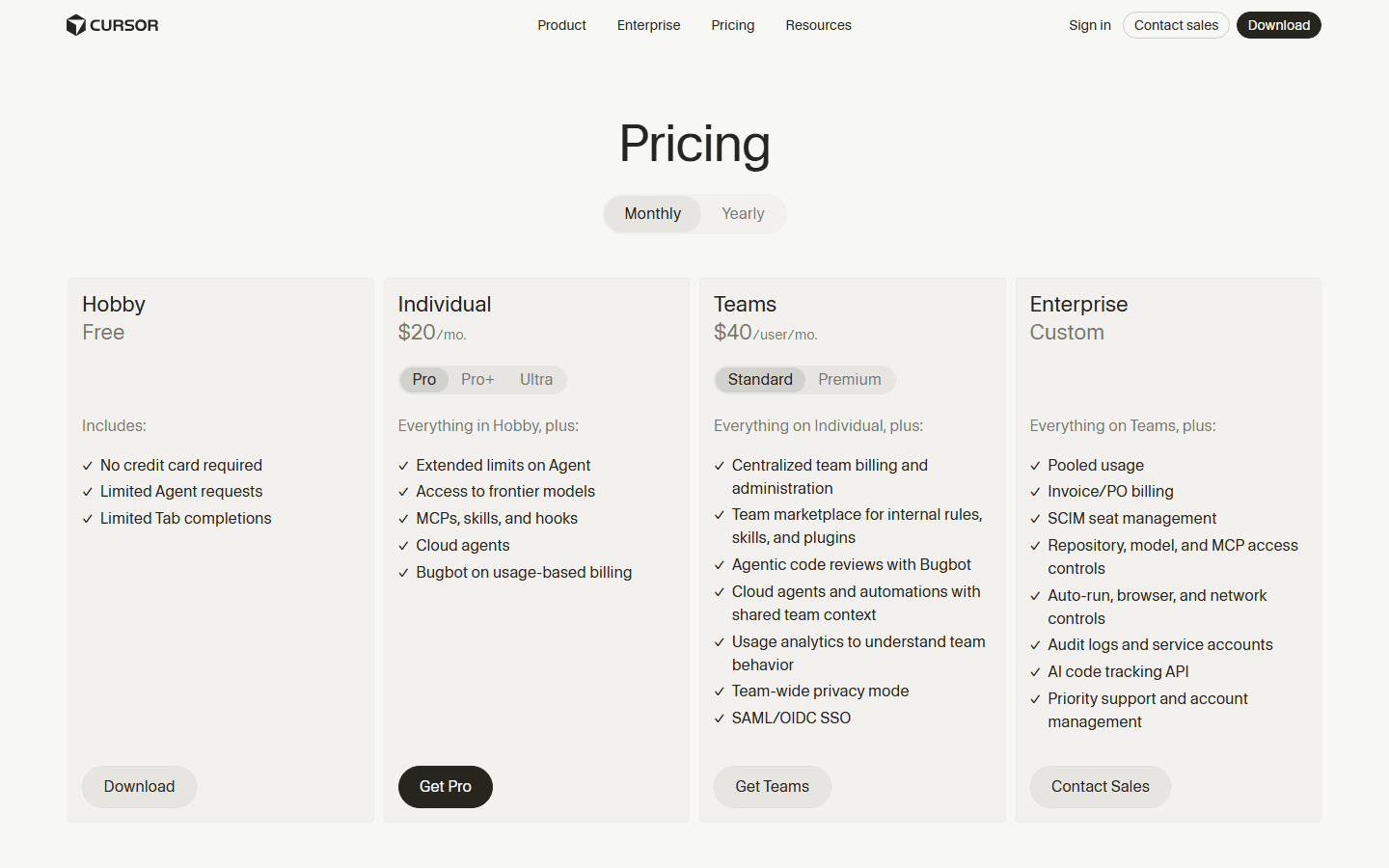
If you only compare the first paid individual plan, the pricing fight is boring. Cursor Individual starts at $20 per month. Devin Desktop Pro also lists $20 per month. That makes the search result answer easy and almost useless. The question is not just "which one is cheaper?" It is what each product includes, where the quota pressure appears, and how quickly you need a higher tier.
Cursor's pricing page says the Individual plan includes extended Agent limits, access to frontier models, MCPs, skills, hooks, cloud agents, and Bugbot on usage-based billing. Teams starts at $40 per user per month and adds centralized billing, admin controls, a team marketplace for internal rules and plugins, shared team context, privacy mode, SAML/OIDC SSO, and usage analytics.
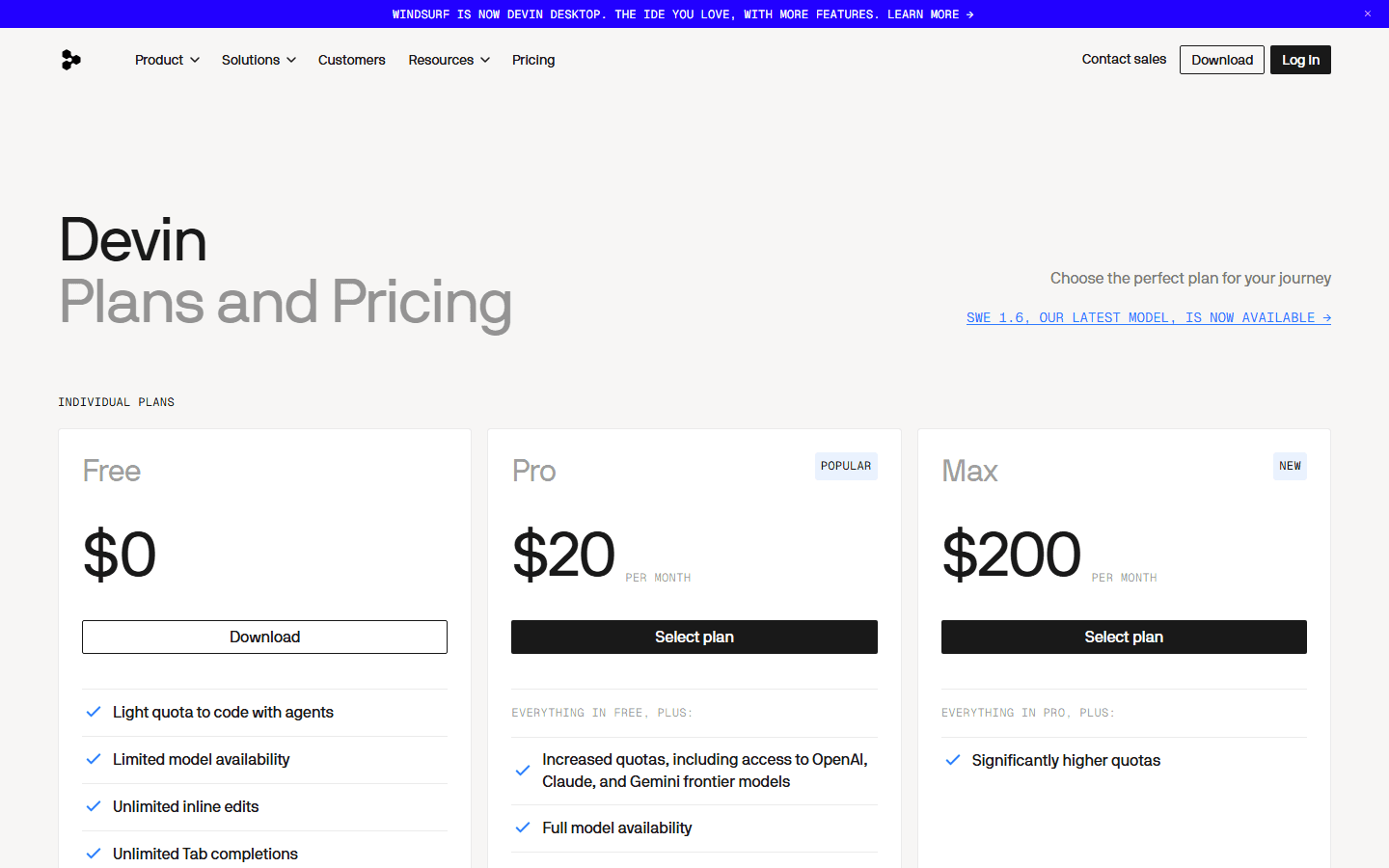
Devin's pricing page, which is now the Windsurf/Devin Desktop buying page, lists Free, Pro, Max, Teams, and Enterprise. Pro is $20 per month. Max is $200 per month. Teams is $80 per month for the team plan plus $40 per month per full developer seat. The Pro plan mentions increased quotas, OpenAI, Claude, and Gemini frontier models, leading open source models, Devin Cloud access, and extra usage at API pricing.
My read: Cursor is easier for a small team to model in a spreadsheet. Devin Desktop is easier to justify if you are buying into the Devin workflow, not only buying an editor. That does not make one cheaper in the abstract. It means you should price the workflow you will actually run.
A solo developer who wants Tab, chat, and occasional agent help can start either product at $20 and know enough after a month. A team with shared instructions, privacy controls, and admin requirements should spend more time on Cursor Teams. A team already leaning on Devin Cloud should spend more time on Devin Teams because the desktop IDE may be only one part of the bill.
| Plan | Official listed price | How to read it |
|---|---|---|
| Cursor Hobby | Free | Limited Agent requests and limited Tab completions. Good for trying the editor, not enough for a serious daily comparison. |
| Cursor Individual Pro | $20 per month | The normal paid starting point. Cursor lists extended Agent limits, frontier models, MCPs, skills, hooks, cloud agents, and Bugbot on usage-based billing. |
| Cursor Teams Standard | $40 per user per month | Adds centralized billing and administration, internal marketplace features, team privacy mode, SAML/OIDC SSO, Bugbot reviews, and shared team context. |
| Devin Desktop Free | $0 | Light quota to code with agents, limited model availability, unlimited inline edits, and unlimited Tab completions according to Devin's pricing page. |
| Devin Desktop Pro | $20 per month | Adds increased quotas, frontier model availability, leading open source models, Devin Cloud access, and extra usage at API pricing. |
| Devin Desktop Max | $200 per month | A higher quota individual plan for people who know the IDE and agent workflow are already central to their day. |
| Devin Teams | $80 per month plus $40 per full dev seat | A team plan with collaboration, centralized billing, admin analytics, and priority support. |
Editor feel
Cursor feels like an AI-first editor. Devin Desktop feels like Windsurf being folded into a larger agent system.
Cursor's biggest advantage is not one feature. It is coherence. The product gives you autocomplete, chat, Agent, rules, MCP, cloud agents, and code review inside a mental model that still feels like a code editor. That sounds boring until you watch a team adopt an AI IDE. Boring is good when people need to keep shipping.
Cursor also rewards people who like explicit instructions. You can put reusable behavior into project rules, global preferences into user rules, and shared expectations into team rules on paid team plans. If you already maintain AGENTS.md or similar repo instructions, Cursor's official docs make that pattern feel native rather than bolted on.
Devin Desktop has a different charm. The Windsurf lineage was always good at making the agent feel like part of the coding flow, especially through Cascade. The transition to Devin Desktop does not throw that away. Instead, Devin is trying to connect that IDE flow with local agents, cloud agents, Spaces, and a command center. If you like the idea of one agent family across editor and cloud work, that is the case for Devin Desktop.
The risk is attention cost. Developers are already tired of products that ask them to relearn a workday for a 9 percent improvement in a demo. Cursor asks for less conceptual migration. Devin Desktop asks for more trust that the new Devin-shaped experience will keep the parts of Windsurf people liked while making the agent layer stronger.
This is why I would not rank either one from a feature page alone. Open both for an ordinary task. Fix a flaky test, add a field to a typed API response, update a component, and write a small migration. Notice which editor makes you look at the UI less. That is usually the one you will keep.
Rules and repeatability
Cursor wins the rules story today because it makes repeatable context painfully explicit.
Rules are not glamorous. They are also where AI IDEs start to become usable for serious work. A coding agent without durable instructions is like a junior developer who forgets the team style guide every morning. You can still get good output, but you spend too much time repeating yourself.
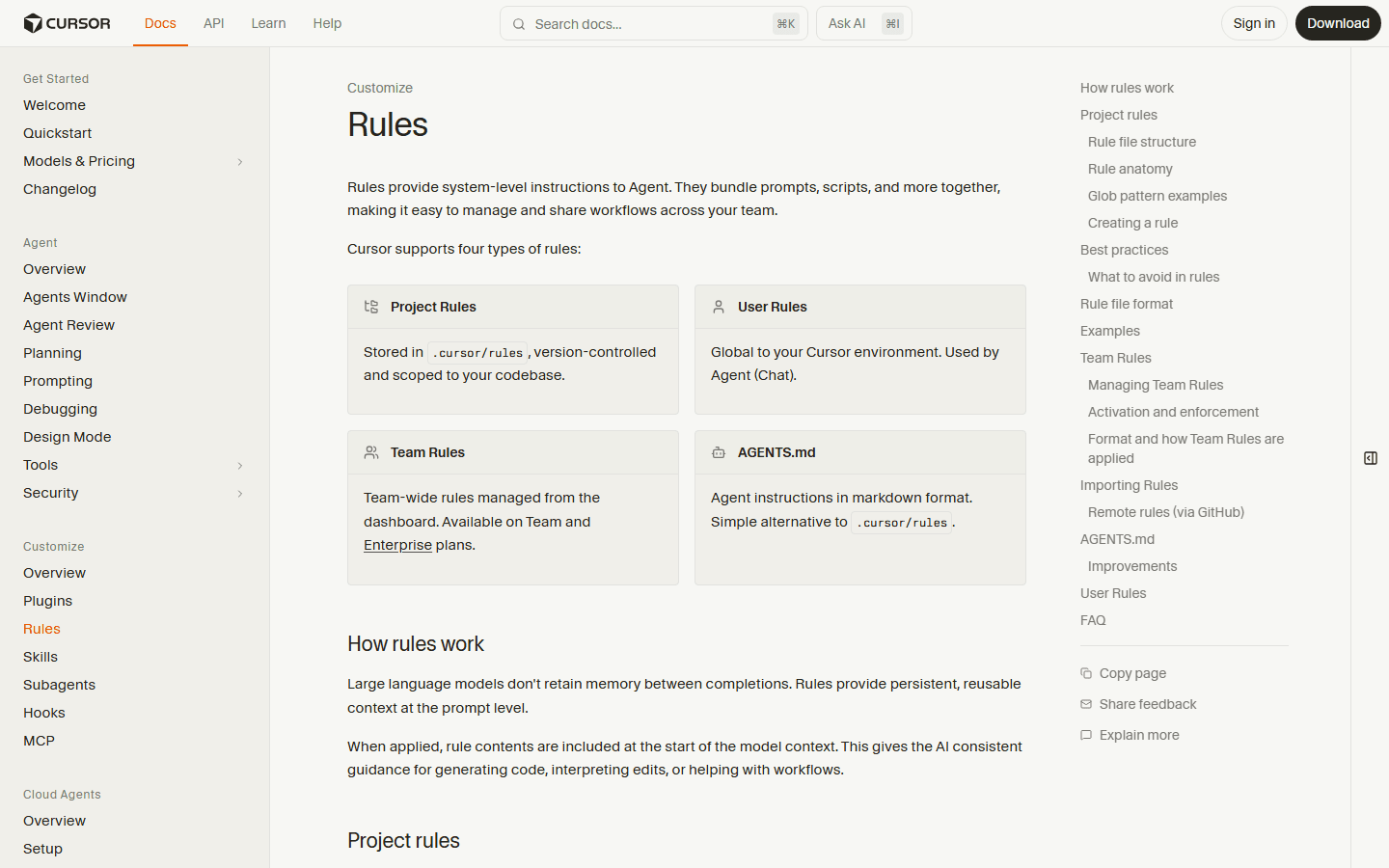
Cursor's official rules page says rules provide system-level instructions to Agent and can bundle prompts, scripts, and other workflow context. It documents four practical buckets: project rules in `.cursor/rules`, user rules for your Cursor environment, team rules for Team and Enterprise plans, and AGENTS.md as a markdown instruction alternative.
The useful part is not the folder name. It is the behavior. Project rules can be version controlled and scoped to a codebase. Rule activation can be always-on, attached to matching files, selected by the agent based on a description, or manually mentioned in chat. That lets a team write rules for tests, API clients, design tokens, database migrations, or review standards without turning every prompt into a mini-novel.
This is where Cursor has a practical edge in the cursor vs windsurf decision. If you need a tool for one person, you can tolerate some context mess. If you need a tool for six developers, you need the assistant to remember the same boring rules every time: do not invent API fields, run the right tests, keep screenshots full width in blog sections, avoid banned colors, and so on. Cursor makes that work legible.
Devin Desktop is not context-free. The product has Cascade, context awareness, Codemaps, rules, and Devin Local. Existing Windsurf users should not assume their instruction habits are dead. But Cursor's rule system is easier to explain, easier to audit in a repo, and easier to sell to a team that cares about repeatable behavior more than agent theatrics.
Agent work
Cursor has the clearer editor-to-cloud bridge. Devin Desktop has the more ambitious platform bridge.
The agent comparison is where the choice gets interesting. Cursor Cloud Agents run in isolated VMs with development environments that can include cloned repos, dependencies, secrets, startup commands, and network access. Cursor's docs also say you can run many cloud agents in parallel and that they do not need your local machine to stay online.
That is the kind of feature that changes team throughput when it works well. A local chat assistant can help you patch the file in front of you. A cloud agent can take a small issue, run tests, push a branch, and open a pull request while your laptop is doing something else. The difference is not magic. It is environment and autonomy.
Cursor's approach is easier to place in a normal engineering workflow. Source control connects. Agents work against repos. They can use managed or self-hosted runtimes. They can inspect context, run commands, and open pull requests. You still need review discipline, but the workflow is recognizable to any team that already lives in GitHub, GitLab, Bitbucket, or Azure DevOps.
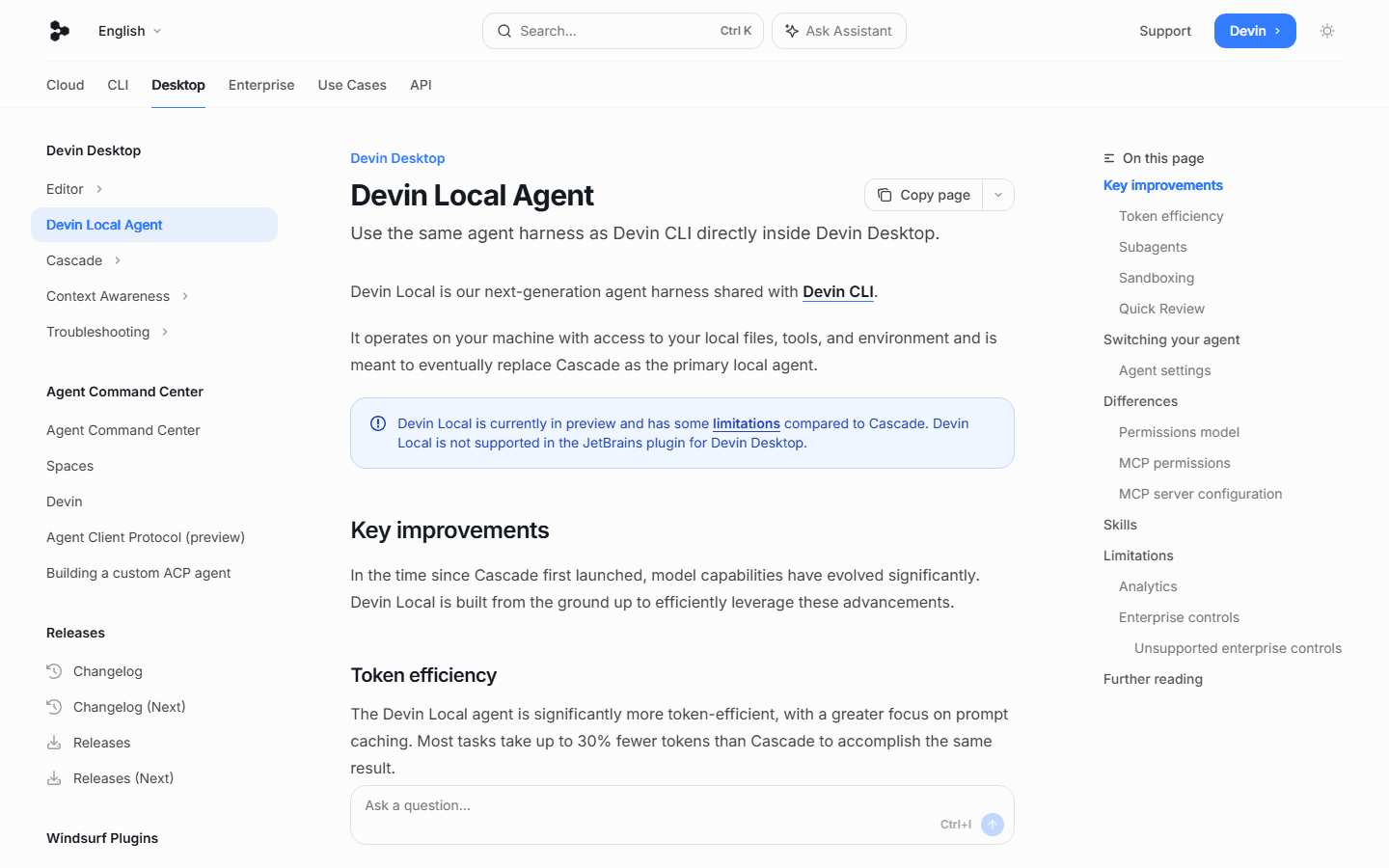
Devin Desktop's agent story is more layered. Devin Local is described as the next-generation local agent harness shared with Devin CLI. It runs on your machine with access to local files, tools, and environment. The docs say it is meant to eventually replace Cascade as the primary local agent, while also noting that Devin Local is currently in preview and has limitations compared with Cascade.
That last sentence is important. If you want the safest choice today, preview status is a caution flag. If you want to ride the product direction, it is exactly the part to watch. Devin is trying to make the local IDE and the larger Devin agent stack feel like one system. That could become a real advantage if the handoff between local context and cloud work gets smooth.

Tab and context
Autocomplete is not dead. It just has to stop acting like a party trick.
Most AI IDE reviews spend too much time on chat and not enough time on Tab. That is backwards for many developers. The assistant you feel most often is the one living in the next line, not the one writing a five-file plan in a side panel. Bad autocomplete is a pebble in your shoe all day. Good autocomplete disappears.
Cursor's pricing page still uses limited Tab completions as a distinction on the free Hobby plan, which is a quiet reminder that Tab remains core to the product. Cursor's broader value is that Tab, Agent, rules, and cloud work sit in the same editor experience. The assistant can be small when the task is small and larger when the job needs repo context.
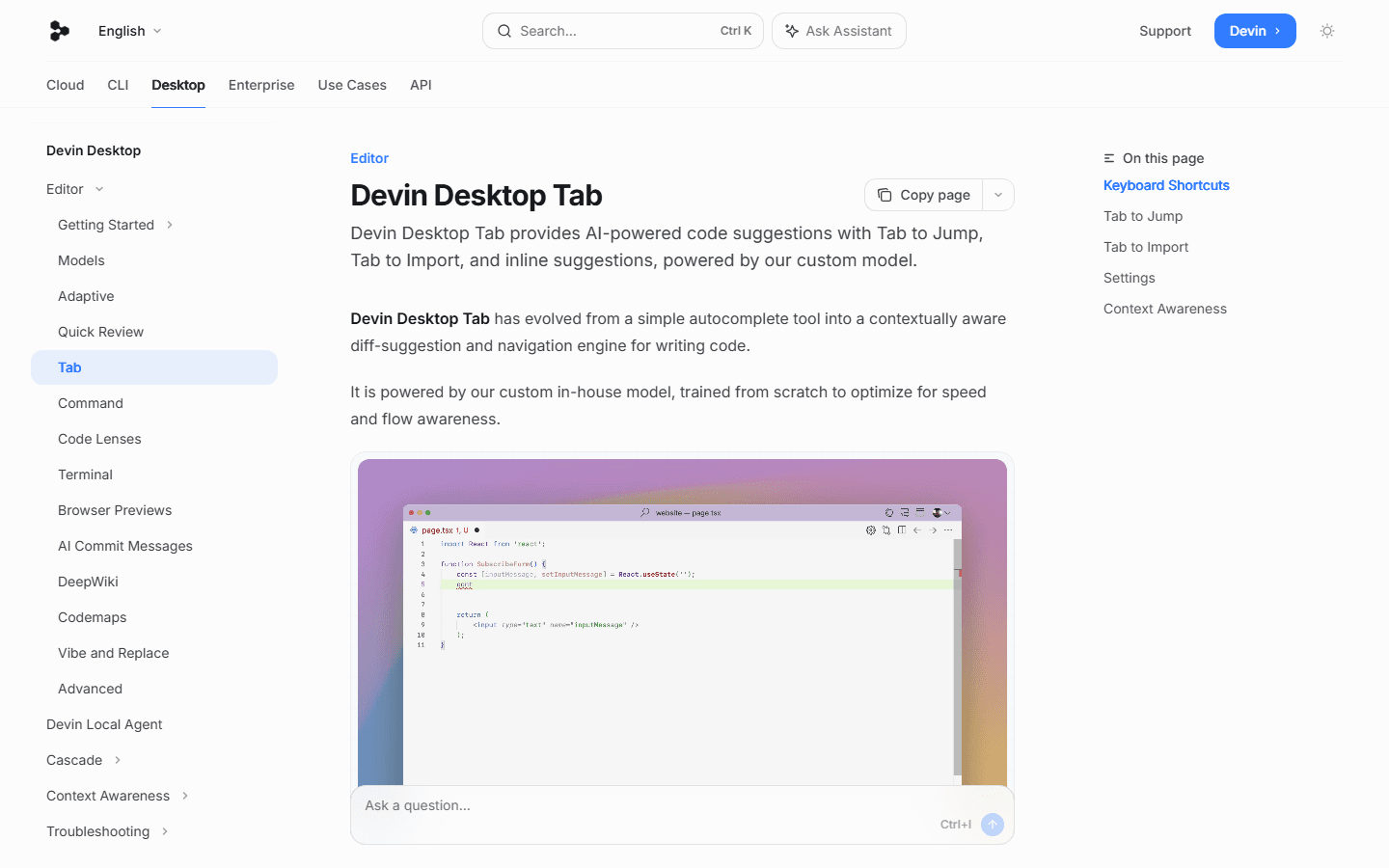
Devin Desktop makes a more explicit Tab pitch in its docs. Devin Desktop Tab includes Tab to Jump, Tab to Import, and inline suggestions. The docs describe it as a context-aware diff suggestion and navigation engine. It can use editor context, terminal context, Cascade chat history, prior editor actions, and clipboard context if you opt in through settings.
That is a strong argument for existing Windsurf users to give Devin Desktop a fair test before moving away. If Tab already matches your coding rhythm, do not throw that away because a pricing table looked tidier elsewhere. The best autocomplete is personal. It depends on language, repo style, cursor movement, and how often suggestions arrive one thought too late.
My test is simple. Work for two hours in each IDE with chat closed unless you need it. Accept every suggestion that feels right and reject everything else. At the end, ask which tool made you feel slower. That answer is worth more than any public benchmark because you are measuring your actual hands.
Switching pain
The easiest migration is the one that does not make your team rewrite its habits for sport.
Switching AI IDEs is not like switching note apps. Your code editor sits in the middle of everything: terminal habits, keybindings, extensions, language servers, Git workflow, test commands, local services, review style, and small pieces of muscle memory you do not notice until they break.
Cursor has a calmer migration story for many teams because it builds on familiar editor expectations. You can bring repo instructions into rules, use AGENTS.md where that already exists, connect source control for cloud agents, and let skeptics start with the free plan or Pro for a month. The product asks for behavior change, but it does not ask you to understand a brand transition first.
Devin Desktop has a better migration story for current Windsurf users than outsiders might expect. Devin's FAQ says the same IDE, editor, and features remain, with existing work and progress intact. It also says the classic Windsurf experience remains accessible. For a current Windsurf team, the first move is probably not "switch to Cursor." It is "test Devin Desktop after the update and see what actually changed."
The messy group is new buyers who were considering Windsurf because they heard Cascade felt better than Cursor's Agent. Those buyers now need to evaluate Devin Desktop as a Devin product. That may be good news if they want the agent platform. It may be annoying if they wanted a stable Cursor-like editor alternative and nothing more.
I would treat migration like a risk budget. Solo devs can be adventurous because the blast radius is one person. Teams need boring proof. Do the extensions work? Do the keybindings survive? Does the assistant respect repo rules? Can managers understand the plan cost? Can security review the cloud agent model without booking three extra meetings? That is the migration work.
Decision table
Pick by workflow fit, not by which landing page felt smarter.
A good decision table should make at least a few people mad. That is how you know it is specific enough. There are developers who should choose Cursor even if Devin Desktop has a better demo for one task. There are Windsurf users who should stay through the Devin Desktop transition even if the new branding feels noisy. There are teams that should ignore both until their current editor pain is real.
| Situation | Cursor fit | Devin Desktop fit |
|---|---|---|
| Daily editor feel | Cursor feels more like a polished VS Code replacement with AI deeply wired into chat, Tab, rules, and agent flow. | Devin Desktop carries the Windsurf editor forward, but the official docs put the Agent Command Center more front and center. |
| Context control | Cursor's advantage is explicit rule management: user rules, project rules in .cursor/rules, team rules, and AGENTS.md support. | Devin Desktop leans on Cascade history, local context, Tab behavior, Codemaps, and Devin Local. It is more agent-harness flavored. |
| Team governance | Cursor Teams is easier to pitch if your team cares about internal rules, shared context, privacy mode, SSO, and repository controls. | Devin Teams makes sense when the team wants the desktop IDE tied to Devin's broader agent platform and cloud usage model. |
| Cloud work | Cursor Cloud Agents run in isolated VMs with cloned repos, dependencies, secrets, startup commands, and network access. | Devin Desktop Pro includes access to cloud agents through Devin Cloud, and Devin's roadmap points the desktop toward the same agent family. |
| Switching risk | Cursor has the simpler brand story and less product-name churn in 2026. | Windsurf users need to understand the Devin Desktop transition, even if the official FAQ says the same IDE and features remain. |
Choose Cursor if you want the AI IDE with fewer qualifications. It is the better recommendation for teams that need project rules, shared rules, admin controls, recognizable pricing, and a workflow that still feels like an editor first. It is also the better first test for developers who do not already have strong Windsurf habits.
Choose Devin Desktop if you already liked Windsurf and want to see where Devin takes it. The case gets stronger if Cascade fit your style, if Tab suggestions feel better in your repos, or if you want local and cloud agents to share a product family. Just be honest about preview features and the brand transition. Do not pretend those are invisible.
If you are cost-sensitive, start with the free plans and run real work before paying. If you are team-sensitive, start with governance and billing before demos. If you are speed-sensitive, test Tab and small edits before agent marathons. The best AI IDE is not the one that writes the most dramatic plan. It is the one that gets out of your way when the work is ordinary.
Practical test
A one-week bakeoff will tell you more than a month of reading comment wars.
The phrase cursor vs windsurf pulls people into tribal arguments fast. That is fun for social feeds and mostly useless for choosing a work tool. Run both tools against the same week of work. Keep the tasks ordinary. The dull tasks reveal more than the spectacular ones because they happen every day.
Start with a repo you know well enough to judge the output. Do not use a demo repo where anything looks impressive. Add a simple project instruction file. Include your test command, style constraints, import rules, and one thing the assistant must never do. Give both tools the same context. Then stop helping one more than the other.
During the week, write down friction instead of vibes. How often did you interrupt the agent? How often did it edit the wrong file? How often did Tab complete the idea you had versus the idea it wished you had? How often did it run the right verification command without being begged? How often did you trust the diff on first review?
Also track your own behavior. If you keep opening Cursor for refactors and Devin Desktop for autocomplete, that is data. If you keep closing the agent panel in one tool because it makes you nervous, that is data too. People pretend tool choice is rational. Most of it is workflow comfort backed by enough evidence to avoid embarrassment.
Test 1
Move one real branch into both tools, not a toy repo. A tiny starter app hides the hard parts.
Test 2
Give each tool the same rule file or project instruction. The comparison is unfair if one assistant gets better context.
Test 3
Ask each IDE to fix a failing test, then watch whether it runs the test, reads the failure, and narrows the change.
Test 4
Ask each IDE to do a cross-file refactor. Count how many files you had to review by hand before you trusted the result.
Test 5
Ask for one boring documentation update. Bad agents often overbuild simple docs tasks. That is a useful smell.
Test 6
Run one cloud or background task if the plan includes it. You are testing throughput, not just autocomplete.
Test 7
Check the bill, quota, and usage page after the week. The better workflow still has to fit your budget.
At the end, do not ask which product felt more futuristic. Ask which one produced less cleanup. Ask which one made your code review shorter. Ask which one handled your real repo instructions with less drama. Ask which bill you can explain without squinting. That answer is your winner for now.
FAQ
Short answers for people skimming from search.
What is the short answer for cursor vs windsurf in 2026?
Cursor is the safer default for most developers who want a mature AI editor with explicit rules, team controls, and a familiar buying path. Windsurf is now Devin Desktop, so it is more compelling if you already like Cascade or want an IDE that is moving closer to Devin's local and cloud agent workflow.
Is Windsurf still a separate IDE?
The official Devin Desktop FAQ says Windsurf becomes Devin Desktop on June 2, 2026. Devin says it is the same IDE, editor, and features under the Devin brand, with the Agent Command Center more prominent.
Which is cheaper, Cursor or Windsurf?
At the individual entry paid tier, both Cursor Individual Pro and Devin Desktop Pro list $20 per month on their official pricing pages. The difference is in quota wording, included agent workflows, and team pricing, not only the headline price.
Which tool has better rules and project instructions?
Cursor has the clearer official rules system. Cursor documents project rules in .cursor/rules, user rules, team rules, and AGENTS.md support. Devin Desktop has Windsurf rules and Devin rules in its transition story, but Cursor's rules documentation is easier to operationalize today.
Should an existing Windsurf user switch to Cursor?
Not automatically. Existing Windsurf users should first test Devin Desktop after the transition because settings, editor behavior, extensions, keybindings, workflows, and LSPs are meant to remain available. Switch only if Cursor's rules, pricing, reviews, or cloud agents fit your daily work better.
Official sources
Pages checked for pricing, product status, rules, and agent behavior.
Pricing and product wording can change. I used official product and documentation pages for the facts in this guide, then kept the advice practical instead of pretending one screenshot settles the whole decision.


